

TaskFlow: Designing Workflows That Survive Interruption
OpenClaw Academy · Part 2, Issue 14

Before TaskFlow, OpenClaw was a powerful single-session agent. Give it a task, it runs, it finishes — or it doesn’t. If an API call failed at step 3 of a 7-step workflow at 3am, the entire job was lost. Start over. For one-turn tasks this was fine. For anything that takes longer than one session — processing a backlog overnight, running a multi-step approval pipeline, coordinating work that outlasts one conversation — single-session fragility was a fundamental limitation.
The MindStudio April 2026 analysis put it precisely: TaskFlow is the feature that separates a capable personal assistant from a production agent runtime. A webhook-triggered workflow that runs unattended is structurally different from a user typing a command. An agent that can checkpoint its state, survive an API failure, and resume from the last successful step is structurally different from one that either completes or dies.
The three durable patterns
The watchdog loop — an agent that runs on a schedule, checks a condition, acts only when the condition is met, then resumes monitoring. No human in the loop for routine work. The implementation: a TaskFlow YAML with a cron schedule, a condition check step with if_false: end_workflow, and an action step that only executes when the condition is true. The agent exits cleanly when there’s nothing to do — no empty notifications, no unnecessary API calls.
A working implementation: a GitHub notification watchdog that runs every 30 minutes. It fetches notifications, filters to action-required (review requests, mentions, assignments), sends a Telegram summary if any exist, marks them read, and exits. If nothing needs attention, it logs “checked” and exits. Completely silent unless there’s something to act on.
The overnight batch — a multi-step workflow triggered at midnight, with each step checkpointed. A 3am network failure doesn’t lose the work done in steps 1 and 2 — TaskFlow saves state after each successful step and resumes from step 3 on retry. The agent doesn’t start over. It continues.
The resume_on_restart: true setting in TaskFlow is the key: if the process restarts (VPS reboot, OpenClaw upgrade, systemd restart), the workflow picks up from the last checkpoint automatically.
The human-in-the-loop gate — a TaskFlow workflow that pauses at a decision point, sends a structured approval request to a human channel, and resumes based on the response. The workflow can wait hours or days for the human. It has a configured timeout, after which it expires cleanly. This is the correct architecture for any workflow that includes irreversible actions — sending an email, deploying code, making a purchase.
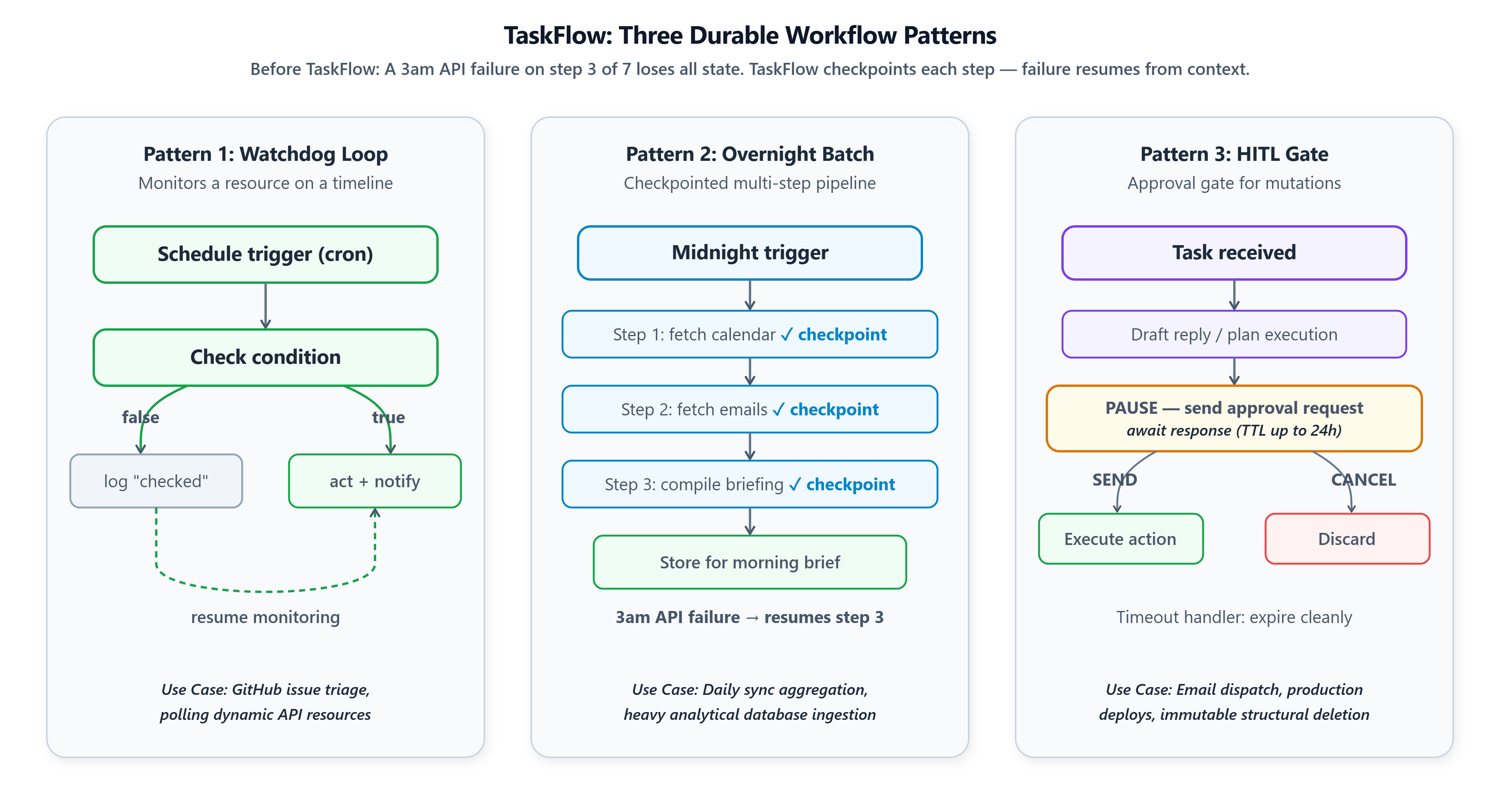
Cron vs Heartbeat — the distinction most tutorials miss
Most TaskFlow tutorials cover scheduled workflows. They skip the Heartbeat feature, which is the simpler and more immediately useful pattern for most new OpenClaw users.
Cron starts a new TaskFlow workflow on a schedule. The workflow has state, checkpoints, steps, and a lifecycle. Use for: multi-step automated jobs, data pipelines, overnight batch work.
Heartbeat (OpenClaw 2026.2.0+) is simpler. It fires a skill on a schedule and sends the output to a channel — without creating a TaskFlow workflow. No state, no checkpoints, no lifecycle to manage. Configure it with four lines in openclaw.json. Use for: daily briefings, status updates, simple scheduled check-ins.
The distinction: Heartbeat is for reporting on a schedule. TaskFlow is for acting on a schedule.
Many engineers who say “I couldn’t figure out TaskFlow” are actually trying to solve a Heartbeat problem with TaskFlow machinery. The vault /part-2/issue-14/ includes both patterns.
Github Link:
https://github.com/sysdr/openclaw-academy/tree/main/part-2/issue-14/vault-files
